
Event Registration Software for Nonprofits

.avif)
TL;DR
- Most nonprofits don't need dedicated event software. They need one checkout that handles tickets and donations in the same place, not a comparison of twenty platforms.
- The real decision is one system or two: whether ticket sales and donations run through the same checkout, or through a separate ticketing tool and a donation platform that never talk to each other.
- That choice sets your per-ticket cost. Disclosed per-ticket fees are fixed; tip-funded "free" platforms move the cost onto the attendee's receipt, where it never shows up on your books.
- It also decides whether a ticket buyer stays findable as a donor. Two separate systems mean an export-and-match exercise after every event; one checkout attaches the purchase to the same donor record automatically.
- Dedicated event platforms still earn their place for auctions, large-scale check-in, multi-session registration, or sponsorship management — just not for most single-event nonprofits.
What is event registration software for a nonprofit?
Event registration software sells tickets, collects attendee details, and takes payment for a nonprofit event such as a gala, a golf tournament, a workshop, or even an annual dinner. Most tools bundle in promotion, check-in, and reporting.
That's the category description, and it's where nearly every article on this topic stops. It leaves out the two things that actually decide the outcome: what each ticket costs you, and where the attendee's record lands.
The decision that matters: one checkout, or two systems
Nonprofits running events usually end up with two systems; a ticketing tool for registration, and a separate donation platform for everything else. It happens by accident. The gala needs tickets, the existing donation platform doesn't sell them, so someone signs up for a ticketing tool in a week when they're busy.
The alternative is a single checkout that handles tickets alongside donations.
The difference doesn't show up on event night. It shows up in what you pay, and in what you can do with the attendee list afterwards.
Why a checkout, and not an events module
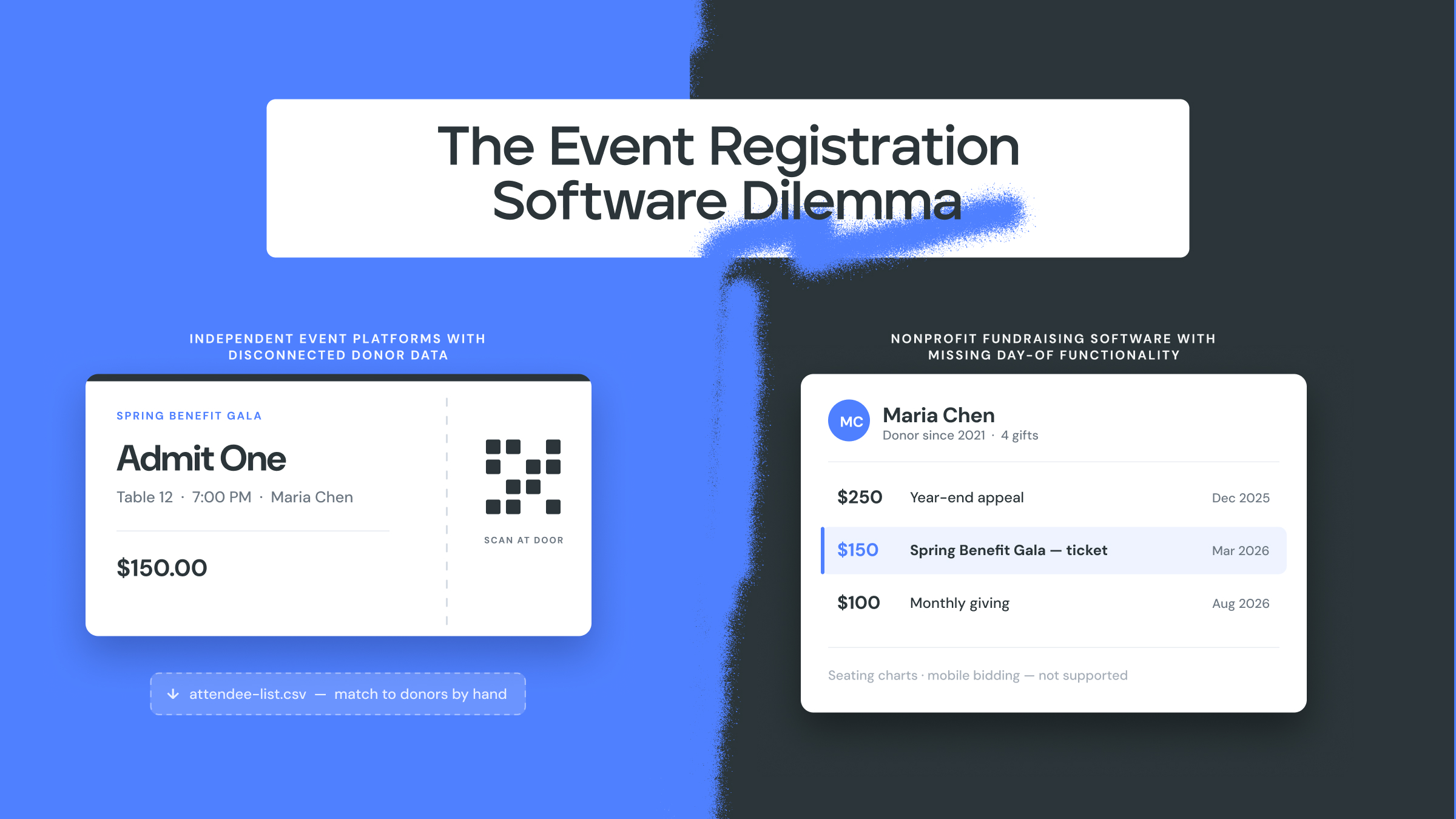
Donately took the second route deliberately, and the reasoning is worth stating because it explains what the product does and doesn't try to be.
The starting observation is that a supporter is doing one of two things: giving money, or buying something. An event registration is the second one; it's purchasing a ticket. So rather than building a separate events section, Donately built Cart Items — a general checkout that handles ticketing, digital products, physical products and membership through the same path as a donation.
The deliberate choice was not to build an events product. A dedicated events module would have handled galas well and nothing else. Cart Items is used for digital gift catalogues at year end, for crowdfunding with tiered rewards, for membership drives, and for event tickets. Every one of those lands in the same place, so the organization can see every transaction a supporter has made in one view rather than syncing systems back together.
If you're large enough to have a system of record, you don't strictly need this. Multiple platforms can roll up into a CRM, and HubSpot does that job well. The single-checkout approach removes the requirement to have one. If you do have one, ticket purchases and donations arrive already distinguishable.
What does event registration software actually cost?
Two pricing models dominate, and they hide the cost in different places.
Per-ticket fees charged to the organization. SimpleTix, for example, publishes a rate of $0.79 + 2% per paid ticket, with no fee on free events and no contract or subscription (as stated on simpletix.com, April 2026). On 200 seats at $150, that's roughly $758 before payment processing; a real number you can plan around.
Tip-funded "free" platforms. Several platforms charge the organization nothing and instead ask the attendee to add an optional contribution at checkout. The organization's cost isn't zero; it's been moved onto the person buying the ticket, and it's variable rather than a fixed cost — the same pattern as the hidden cost of no-platform-fee fundraising tools.
That model deserves a closer look when it's applied to tickets specifically. Someone making a donation is already in a giving frame of mind. Someone buying a $150 seat at a dinner is making a purchase, and being asked to add a voluntary platform contribution on top of a purchase is a different ask. Whether it depresses ticket sales is a fair question, and one nobody publishing in this category seems to want to raise.
What the tip default actually is. Default tip rates on tip-funded platforms vary by vendor, and only one has an observation on file. Zeffy's default is observed at 15% — a pre-selected contribution on a live checkout, dated 6 August 2026, not a claimed average. Givebutter discloses a 3% tips-off rate and publishes no suggested default with the tip on, so that figure isn't stated here. On a $150 seat, a 15% default adds $22.50 for the attendee — the same evidence laid out in full on the Total Donor Cost page.
The third cost, and the one that catches people out: the events add-on. Many donation platforms don't include ticketing in the plan you're already paying for. Events arrive as a premium tier or a paid module. Before you commit, ask the vendor one question “Is event ticketing included in my current plan, or is it an add-on, and what does it cost annually?” For per-tool costs across eight platforms, see Best Event Registration Software for Nonprofits in 2027.
For comparison, Donately doesn't price Cart Items separately; ticketing sits in the same pricing as everything else. On a license plan, a $150 ticket costs $0.75 to process — half a percent. Without a license, the worst case is around 4%, or $6 on that same ticket (Donately first-party, August 2026; the $0.75 figure applies on a license plan).
What happens to the attendee after the event?
This is the question that separates the two setups, and it goes unanswered almost everywhere. Neither of the two highest-ranking pages on this topic; a 4,500-word roundup of twenty-plus tools, and a major platform's own product page, explains how attendee registration data reaches your donor records.
Here's the actual work, when the two systems are separate. You find the tickets in the event tool and run an export. The export doesn't match your donor database's shape, so you build a pivot table to reshape it. You import that into your donation platform or CRM. Then you try to match those rows against the people already in there usually on email, by hand, or discovering that a few dozen didn't match because someone used a work address for the ticket and a personal one for their last gift.
None of that is difficult, it's just tedious. It happens after the event when everyone is tired, and nobody owns it. So often it doesn't happen, and the person who bought a gala ticket in March isn't a donor in your database when you run the year-end appeal in October.
With one checkout there's nothing to reconcile. The ticket purchase and any donation attach to the same person, and the event shows up as part of their giving history rather than as an unrelated transaction.
Let’s be fair to the alternatives: Eventbrite and its peers are good products, and some donation platforms have built event ticketing directly into the donor record too. Ticketing tools aren’t bad, it’s just that the reconciliation problem is specific to running two systems that don't talk.
Does a ticket buyer become a donor?
Honest answer: there's no hard data here, so this stays qualitative.
What's observable is that repeat giving tracks campaign cadence, not event attendance. Organizations that run something consistently like an event in one quarter, crowdfunding for a specific program in the next, peer-to-peer in back-to-school season, a recurring membership push at year end; tend to see more recurring donors than organizations that run one gala and go quiet.
As a result, this reframes the event. It isn't a standalone fundraiser to be reconciled afterwards; it's one campaign in a sequence. That's the practical argument for the single checkout — not that tickets are special, but that running four different kinds of campaign a year is only manageable when they all land in the same donor record.
When do you actually need dedicated event software?
Sometimes you do, and the honest answer is worth more than a pitch.
Buy a dedicated event platform when the event is the operation:
- You're running an auction. Live and silent auctions need bidder numbers, bid tracking, outbid notifications and settlement. That's a specialized product, not a checkout feature.
- You need on-site check-in at scale. Hundreds of attendees arriving in thirty minutes, scanned badges, walk-up sales, and table assignments.
- The event has its own registration logic that includes multi-session conferences, tiered workshop tracks, capacity limits per session, waitlists.
- Sponsorship management is a real workflow with tiers, benefits tracking, and deliverables.
If two or more of those describe your event, a purpose-built platform will do things a unified checkout won't, and the extra system is worth the reconciliation cost.
When one checkout is enough
For most small and mid-sized nonprofits running one or two events a year (a dinner, a tournament, a community fundraiser) the requirements are: sell a ticket, take a few details, collect payment, know who's coming, and keep the donor record intact. That's a checkout, not an event platform.
Cart Items covers ticketing, membership, merch, and digital products through the same checkout that handles donations. There's no second system and no reconciliation step. Additionally, the same mechanism runs your next three campaigns, whatever shape they take. If your event needs bidder numbers and session tracks, it isn't the right tool, and the section above says so plainly.
Curebound*, a San Diego cancer-research nonprofit, ran event registration for an in-person event, then concert tickets promoted to those attendees, then content captured at the event, then a year-end "a world without cancer" campaign inviting supporters to submit their own stories. They did all of that in one giving platform. Four campaigns, each feeding the next, across one year.
* Curebound was a strategic initiative and client project by Fifty and Fifty, the sister strategic agency to Donately and the creative team on the other side of the house — no Donately products were used in this particular campaign. It's included here because the cadence argument, not the software, is what this section is making.
Frequently asked questions
Can you sell event tickets and collect donations in the same place?
Yes. A single checkout can handle both, so a ticket purchase and a gift attach to the same donor record. Donately does this through Cart Items, which also covers membership, merch and digital products, and runs inside an embedded donation form on your own site.
What does event registration software cost a nonprofit?
It depends on the model. Per-ticket pricing is typically a flat fee plus a percentage. SimpleTix publishes $0.79 + 2% per paid ticket (April 2026) — charged to the organization. Tip-funded platforms charge the organization nothing and ask attendees for an optional contribution instead — Total Donor Cost sets out how to compare the two on one number. A third cost is easy to miss: many donation platforms sell event ticketing as a premium tier or add-on rather than including it. Payment processing is usually additional in all cases.
Is a gala ticket buyer a donor?
In your database they should be the same person. Whether they give again depends more on whether you run consistent campaigns than on the event itself; and on whether the two records were ever connected in the first place.
Do you need dedicated event software for a small fundraiser?
Usually not. Auctions, large-scale on-site check-in, multi-session registration and sponsorship management justify a dedicated platform. A single annual dinner generally doesn't.
Do I have to move off Eventbrite to keep my donor data clean?
Not necessarily. If you have a CRM as your system of record and something reliably syncs into it, two systems can work. The single-checkout approach removes the need for that layer rather than replacing a working one.

Let's Fundraise Together!
Sign up today and see why thousands of organizations trust Donately to manage their online fundraising.
.webp)